
Change Vector Analysis explained graphically

Change Vector Analysis explained graphically

January 19, 2016

We explained in our book “Remote Sensing and GIS for Ecologists – Using Open Source Software” among other change detection methods also the change vector analysis practically using the rasterCVA() command in the RStoolbox package, as well as outlined the approach graphically. During my last lecture on temporal and spatial remote sensing approaches I realized that the graphic needs some fixing as well as the RStoolbox function, moreover, certain explanations were missing. Hence, Benjamin Leutner adapted the rasterCVA() command and I tested it again and created new graphics explaining this approach for land cover change analysis.
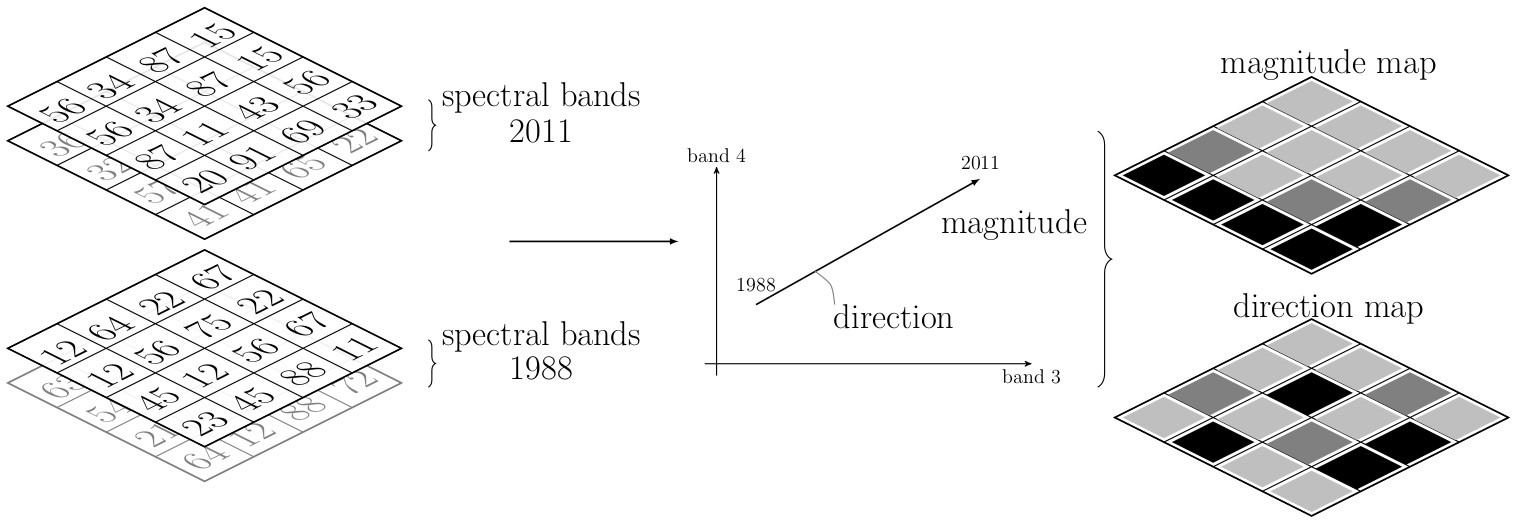
 

land_cover_change_vector_NEW_Wegmann_Leutner_www_remote-sensing_eu_Ecology_Book

general Change Vector analysis explained. Graphic from the book “Remote Sensing and GIS for Ecologists

The first graph that is also in our book shows the general approach. Two bands for each year (e.g. the RED and NIR band, but also the Tassled Cap output can be used) are taken and the changes in pixel values between these two years are shown as angle and magnitude.


We realized some things were missing:  first the explanation what the angle actually means and second a link of actual results and the xy-graph.
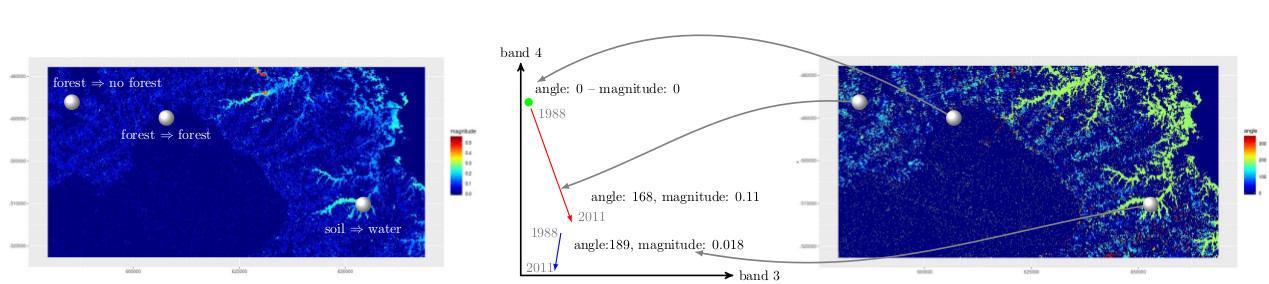
change_vector_analysis_angle_magnitude_NEW_Wegmann_Leutner_www_remote-sensing_eu_and_BOOK_ecosens_org

Change Vector analysis explained on three change classes using the actual rasterCVA() output and band values.

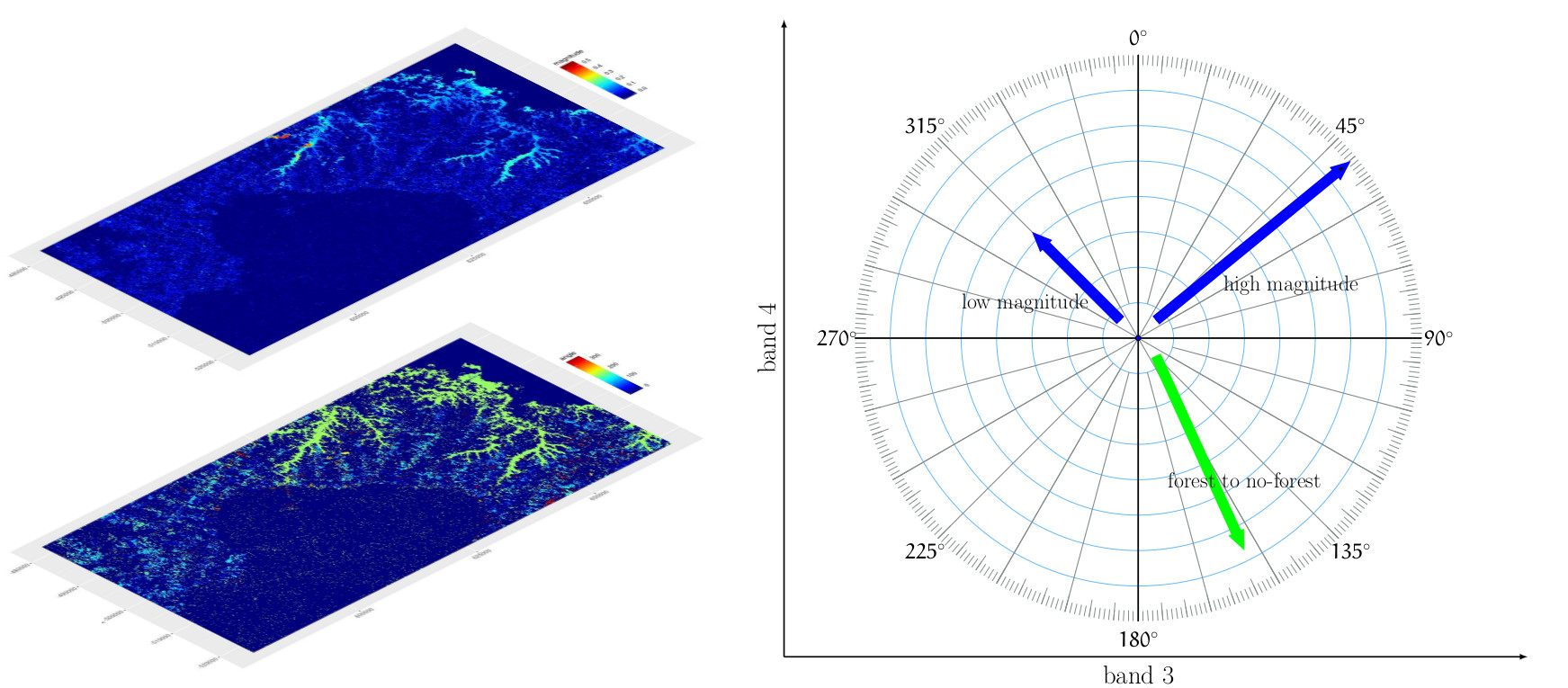
In these new figures we show the actual results of the land cover change vector analysis using band 3 and 4 of Landsat (E)TM for the study region used in our book and three angles and magnitudes of pixels values between 1988 and 2011.
change_vector_Angle_explanation_Wegmann_Leutner_www_remote-sensing_eu_BOOK_RS_Ecology

Meaning of angle and magnitude values from rasterCVA() analysis in RStoolbox

In the second image we outline the meaning of the angle provided by rasterCVA() as well as the magnitude which is the euclidean distance of the pixel values between 1988 and 2011.


Please approach us if you have any suggestion how to improve it or if we introduced any errors.

Please update to the newest development version to access the updated RStoolbox functionality!


More updates and graphics provided on the books’ webpage.

follow us and share it on:

you may also like:

Hackathon within the Super-Test-Site Project

Hackathon within the Super-Test-Site Project

What happens when researchers and developers sit down together to explore a multidisciplinary urban dataset? Our researchers from the EORC joined a hackathon that took place within the Super-Test-Site Project, organised by Prof. Dr. Gunther Gust from the Chair of...

Field Days in the Oberpfalz: Exploring FSME Hotspots

Field Days in the Oberpfalz: Exploring FSME Hotspots

On April 17th and 29th our researchers Sofía and Ariane had two field days in the areas around Amberg and Schwandorf, one of Germany's most well-known TBE (tick-borne encephalitis) risk regions. They joined Prof. Dr. Gerhard Dobler and Dr. Lidia Chitimia-Dobler from...

Johannes Mast has successfully defended his PhD Thesis

Johannes Mast has successfully defended his PhD Thesis

Johannes Mast defended his PhD Thesis titled "Geographical Migration Research using Remote Sensing and Social Media Data" at the Julius-Maximilians-University Würzburg successfully on the 29th of April 2026. We congratulate him very much for his...

EAGLEs at SANParks – Kruger National Park

EAGLEs at SANParks – Kruger National Park

Our EAGLEs Sebastian Rothaug and Clemens Schömig just finished their 2+ months for the internship/InnoLab in Kruger National Park. The work was done with SANparks, Dr. Coetsee and Dr. Wigley within a year-long collaboration of EORC researcher Dr. Bevanda. The...

Share This